Host change
By Robert Ellison. Updated on
I'm switching hosts so there will be various DNS changes and some downtime today.

4K timelapse of stars and the Milky Way over Lake Tahoe, California.

It's useful to know when you have a new website referrer. Google Analytics is plagued with spam referral and you want to filter this out of reporting as quickly as possible to stop it from skewing your data. It's also helpful to be able to respond quickly to new referral traffic - maybe leave a comment or promote the new link on social media.
The script below will send you a daily email with links to any new referrers (this is GA3, there is a GA4 version later in this post).
Start a new apps script project in Google Drive and paste in the code. At the top enter the view ID that you want to monitor and the email address that should receive reports.
Choose Advanced Google Services from the Resources menu and switch on the Google Analytics API. Then click the Google API Console link and enable the Google Analytics API there as well.
Finally pick Current project's triggers from the Edit menu and trigger the main function daily at a convenient time.
This script saves known referrers in script properties. For a site with lots of traffic this may run out of space in which case you might need to switch this out and write known referrers to a sheet instead.
For Google Analytics 4 properties use the version of the script below. The setup process is the same, but you need the Google Analytics Data API instead of the Google Analytics API.
I needed a console app that reads some inputs from an online Excel workbook, does some processing and then writes back the results to a different worksheet. Because I enjoy pain I decided to use the thinly documented new Microsoft.Graph client library. The sample code below assumes that you have a work or education Office 365 subscription.
Paste the code into a new console project and then follow the instructions at the top to add the necessary NuGet packages. You'll also need to register an application at https://portal.azure.com/. You want a Native application and you'll need the Application ID and the redirect URL (just make up some non-routable URL for this). Under Required Permissions for the app you should add read and write files delegated permissions for the Microsoft Graph API.
Hope this saves you a few hours. Comment below if you need a more detailed explanation for any of the above.

A deer on a treacherous cliff-top path at Point Reyes.
I'm switching hosts so there will be various DNS changes and some downtime today.

View of the Pacific from the lighthouse at Point Reyes National Seashore.
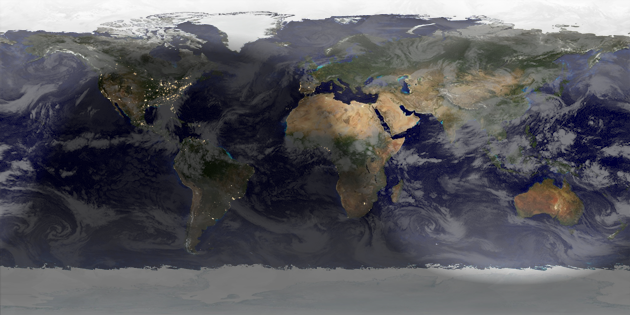
Summer starts now (or Winter for the Southern Hemisphere). Rendered in Catfood Earth.
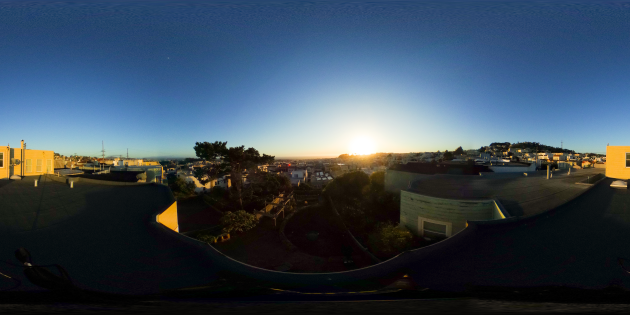
An experimental spherical timelapse of a sunset looking west over the Pacific from West Portal, San Francisco.
In your browser use w, a, s, d to tilt and pan. Best viewed in a VR headset.
Shot on the Richo Theta S, post processed with Lightroom, LRTimelapse and FFmpeg.

5/5
Stonking near future bio thriller.
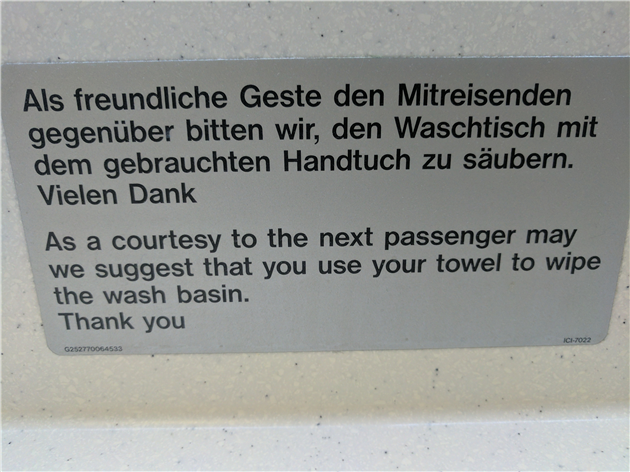
I'm on a recently built A340-600. This sign is about as useful as the ashtrays. This must be a weird tradition that gets handed down from airplane to airplane from one sign author who got grossed out by the thought of a moist sink but has never squelched around in piss on the lower deck stink fest that is installed on this particularly strange airbus.
It's like someone loved the whole elegant spiral staircase up to a bar motif of the 747 and thought wouldn't it be a giggle to do the exact opposite.
Robert Ellison's blog, I Thought He Came With You, on the Fediverse via fed.brid.gy. Photography, time lapse, programming, politics, hikes and more.