Commentary

By . Updated on

Comments

I started with Blogger many years ago. It worked well for a while and then it didn't. I forget why but I wrote a tool to migrate from Blogger to BlogEngine.net.

BlogEngine.net was good for a while, but I never loved the commenting system. I switched to Disqus and I wrote a tool for that as well.

Then Disqus decided to monetize more aggressively than I liked, and I moved on to Facebook comments. Having used these for a while I have come to the conclusion that most people just hate Facebook comments. They're convenient but not many people use them. Also, pages just load much faster without all the Facebook JavaScript. So today I'm switching to home grown manually moderated comments. Just about every comment ever left on this blog has made it from Blogger to BlogEngine.net to Disqus and finally the new system, even the nasty ones. I'll moderate to cut out spam but never dissent. Enjoy!

Updates were installed...

By . Updated on

Microsoft you are literally killing me. Please tell me there is a reason.

Windows 10 has had a reorg of notifications. People in Redmond have spent quality time thinking about how and when to bother me. User experiences have been imagined, focus grouped, re-imagined, tested, pushed out to beta, revised, polished and finally shipped in a heaping turd of time wasting.

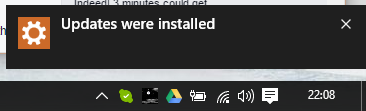
After one of the never ending reboots following some critical update or other I get a nice popup to let me know that updates were installed:

Updates were installed...

I'm not sure this is the most important news I'll read all day but fine, thank you and I click the little x to dismiss.

Windows at this point knows that it's told me about the updates, and it knows that I've seen the message because I took the time to actively dismiss it.

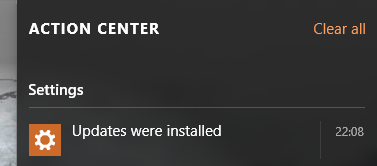
So why is this now in the Action Center:

Updates were installed...

I have to acknowledge my latest helping of updates all over again. It's the sort of double confirmation I'd really value before inadvertently nuking Belgium but for pretty much anything I've ever seen in Action Center it's overkill. It's causing the most anger I've had with an Operating System since I had to Google how to shut down Windows 8.

Windows 10 is on 110 million devices. Assuming a reboot a week and three seconds per device spent dismissing the extra message we're looking at a cost of $28 million a year (at US GDP). Microsoft has said it expects a billion Windows 10 devices in 2-3 years. Even at global average GDP that's $64 million down the drain.

It's not a quirky design decision, it's a class action lawsuit waiting to happen.

Smart people must have spent time on this. Please tell me why?

A vacation based proof of the many-worlds interpretation of quantum mechanics

By . Updated on

A vacation based proof of the many-worlds interpretation of quantum mechanics

It's a well known fact that whenever you go on holiday your home town experiences once-in-a-generation levels of good weather while you sit inside with increasingly insane children watching unseasonably torrential rain.

As this is a universal experience it has to be more than bad luck.

Every time anyone takes a vacation a parallel universe must be created where the traveler inflicts stormy weather on one branch and summer continues as normal on the other.

​Tags: random, quantum, weather​

Hope for Hulu?

By . Updated on

Hope for Hulu?

Probably not.

I tore into Hulu last year for the miserable user experience, dreary ads and vanishing content.

Back then I estimated that Hulu could ditch the ads for another $6 a month. TechCrunch is reporting today (via the Wall Street Journal) that Hulu is considering an ad free tier for $12-$14 a month. $14 would be a $6 bump over current pricing. If they can fix the UX as well I'll be back in. And I still want my OTT TiVo.

(Previously)

Not to be anal but (any number of dogs...)

By . Updated on

Not to be anal but (any number of dogs...)

Google is going to start ranking pages based on facts. I'm game. This MUNI sign has always bothered me.

The highest capacity vehicle in the MUNI fleet has to be a two-car light rail vehicle. Capacity 436 people. The average weight of a person is 185 pounds. So we're looking at 80,660 pounds per rush hour train.

The lightest dog is a 1.4 pound Chihuahua named Ducky.

So at the absolute outside with no other passengers the limit is 57,614 dogs. I'm going to have to make some stickers...

Capture DropCam (Nest Cam) frames to Google Drive

By . Updated on

Capture DropCam frames to Google Drive

Updated June 17, 2019: This is now broken for Nest/DropCam devices. It will still work for anything that has a web accessible image URL. Clint points out in the comments below that you can fix up the URL for Nest cams but it looks like you need to be logged into nest.com so it doesn't work from Apps Script. Google is also retiring Works with Nest because they're "...reimagining how technology and services can deliver simple and helpful experiences in your home..." which apparently translates to only working with Google Assistant. I'll update this post if I figure out a work around.

Here's an easy way to capture frames from a DropCam to Google Drive. This only works if you have a public feed for your DropCam.

Go to the public page for your DropCam (Settings -> Public -> Short URL Link) and then view source for that page. Near the top you can find the still image URL for your DropCam:

<meta property="og:image" content="https://nexusapi.dropcam.com/get_image?uuid=12345&height=200" />

In Google Drive create a new Apps Script (If you don't already have Apps Script you can find it via Connect more apps...). Paste in the following code:

Replace the uuid parameter in the URL with the uuid from the still image URL for your DropCam. Note that the height parameter in the script has been changed to 1280 to get the largest possible image. A timestamp is being used to add a random cache busting parameter to the still image URL and is also used as the filename for the image.

The script will save the images to a folder called DCFrames - either create this folder in your drive or change this parameter to the desired folder.

Run the script and check that it's working. If everything looks good go to Resources -> Current project's triggers in the Apps Script editor. You can now set up a timer to save a frame as frequently as every minute (which I'm using to collect frames to make a daily time lapse movie). You can also ask Apps Script to send you an email when the script fails.

Updated 2015-07-01: DropCam is now Nest Cam - assuming that Nest keep the API going everything should keep working as above for both types of camera.