Route Map

By . Updated on

Robert Ellison's Route Map

I have been in the habit of posting each plane I fly on for a long time.

This started on Twitter, where for a while there was this #boarding hashtag so you could chat with people in transit from the same airport by IATA code (like #boarding #sfo). That dropped out of usage, because why would you do that, but I continued on Facebook until I deleted social media in 2018. After a brief lapse I started posting to my blog. I have a vague intention to resurrect some older flights with AI and build out a more complete history.

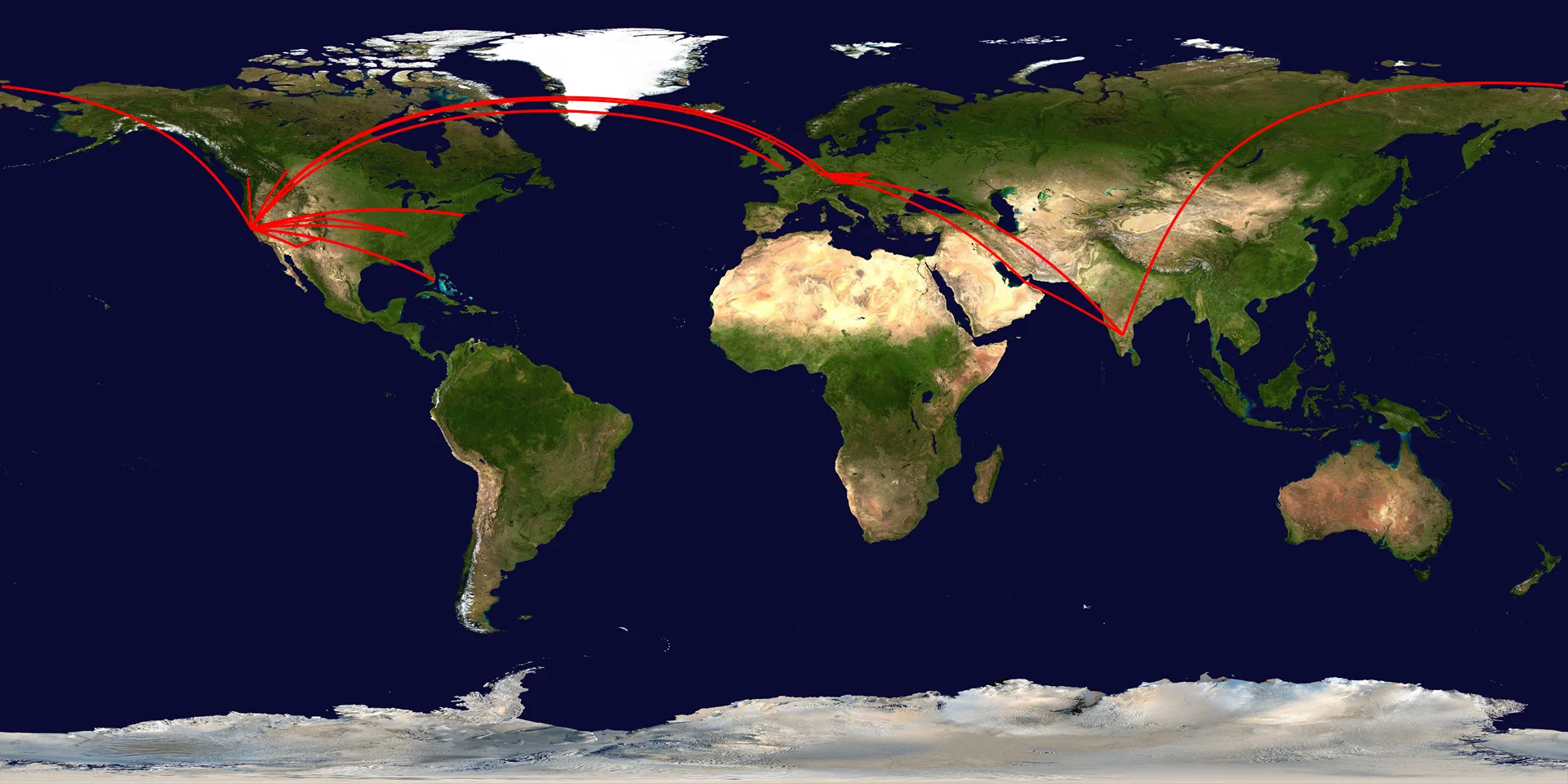
After adding flights here for a few years it seemed like a good idea to do some visualization. The image above (click for a larger version) is my current route map, updated after each flight. The routes are great circles rather than the actual track (created via the .net version of GeographicLib and this geolocation of airports). You can view individual flights here. I could probably use a carbon offset or two (unless this).

Required disclaimer:

This site or product includes IATA/ICAO List data available from https://github.com/ip2location/ip2location-iata-icao.

Updated 2026-02-07 23:07:

The vague intention turned into a mild obsession and so I mined email for more flights. I have email going back to 1996 and quickly whipped up two scripts via GitHub Copilot and Claude Sonnet 4.5 to process them. The first searched and downloaded any likely candidates from gmail and converted the HTML email to markdown to save on tokens. The second ran all the candidates through GPT 5 mini to extract the details. I then added a few older flights from memory resulting in the image above. There are some work emails I don't have access to so I'm sure it's not totally comprehensive, but I'm now up to 300 flights and approximately 868,381 miles.

Get an email when a new OpenAI model is available via the API

By . Updated on

Notification of a new OpenAI ModelMeta: Google Apps Script code to send an email alert whenever a new OpenAI model is available through the API.

Here's a simple Google Apps Script to monitor for new OpenAI models:

To get this running, paste into a new Apps Script project and enable the Gmail API under services. Add your email address and OpenAI API Key at the top. Run a couple of times and you should get an email with all the current models and then nothing the second time unless you get lucky. On Triggers set a scheduled execution with whatever frequency feels good (I use daily) and you're all set.

I Love Email

By . Updated on

HELO

Everyone is always trying to kill email, and it's always because it's a supposed productivity villain and life will be so much easier when we can all live happily in some chat based universe. I've spent enough time in Slack and Teams and their predecessors to know that we should go back before it's too late.

Chat brings you infinite inboxes and no great way to tell which of them is important. Having looked away for a few minutes there are dozens of unread conversations. Some of them are people sharing a photo of their cat. One of them is an emergency requiring immediate attention but good luck finding it without wading through everything.

This brings me to a lack of useful state. I handle email in two quick passes - read everything (and discard anything that doesn't need further attention), deal with anything critical and then at some point go back and mop up the rest. In chat though you just blew past something that needs a response eventually and it fades from your mind as you fight the fire elsewhere. I never miss an email, I often miss a chat.

And good luck finding anything. Maybe a market leader or two will establish dominance for long enough but my experience so far has been lurching from one platform to the next, both professionally and personally, and having a hard time finding that one thing I know should be in there from the end of last year. My Gmail has emails going back to 1996, and yes that's almost a decade before Gmail existed. I can find anything.

On the subject of dominance, the real reason for all of the attempted email homicide is that it's one of the last open systems that everyone still uses. If only email would just die you'll be trapped forever in Messenger and Hangouts.

rob@catfood.net

Updated 2026-01-17 23:10:

Cory Doctorow nails this.
Immature Gmail Exploit

By . Updated on

Immature Gmail Exploit

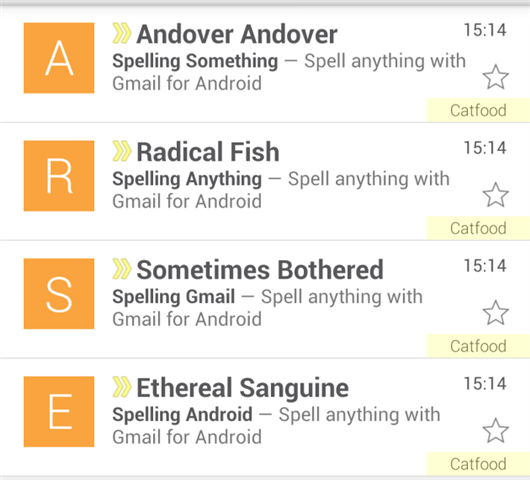
The Gmail Android client helpfully puts the first letter of the name of the person who emailed you in a big block at the left of the mail list (I guess if you have Google Plus friends you probably get a photo instead). But it's pretty easy to change the from name in your email client and trivial to do this programmatically.

Tips... spell your message backwards and use a different subject line for each email so they don't get grouped together.

Chiroopractoor

By . Updated on

Chiroopractoor

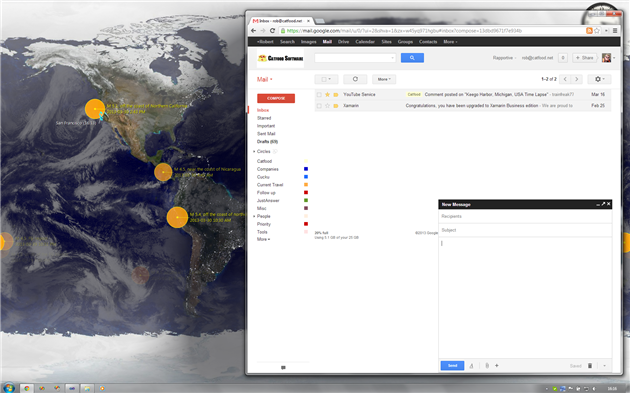
Google's use crime of a new compose window is going to become compulsory soon.

I suspect this is because it will soon be revealed that Google is rolling out a chain of high street Chiropractic facilities to treat the crick in everyone's neck from composing email in the bottom right hand corner of one's screen.

Either that or it's a bid for mobile dominance by forcing PC users to work in mobile screen sized portions of their screen until you just give up and use your phone.