Links for February 2026

By . Updated on

I'm following @ml@social.mitexleo.one. ∞


I'm following @retiolus@mamot.fr. ∞


I'm following @matokie@mastodon.social. ∞


I'm following @mikef@messydesk.social. ∞


Google Apps Script created by primary email (domain), and it opens the blank script in secondary (gmail)

This drives me nuts every time I open apps script and need to switch the account. #google #appsscript #gas


I'm following @AirlineReporter@avgeek.social. ∞


Image to 3D Asset with TRELLIS.2

This is cool, a Microsoft model to convert a photo to a 3D model. I ended up with a dog with two tails but otherwise pretty decent. #3d #ml #microsoft

Bye Skype

Bye Skype

Microsoft is killing Skype in May 2025. I haven't used it for a few years, but I'm going to shed a tear or two.

It's hard to overestimate how important Skype was a little over 20 years ago. I had recently moved to San Francisco and made a lot of phone calls to friends and family back in the UK. There was this thing called a landline, and as well as local service you had to choose a long distance provider with all sorts of complicated tariffs and fees. Cell phones were their own nightmare and even for SMS you paid per text message. Incomprehensibly, ring tones were on their way to being a multi-billion dollar business. My current phone has been on vibrate for its entire life and I travel the world with free high speed Internet included in my plan. Skype marked the beginning of this transition using P2P to open VoIP and video calls to the masses. I even had a cordless phone that made local calls over the phone line but seamlessly switched to Skype for long distance.

Skype's P2P stack could be used for more than phone calls. I built a business to backup your computer over Skype. It's one of the best things I've ever worked on. The Internet was slow for most people. and so you could do a local backup on LAN and then send incrementals P2P via Skype whenever your computer was idle. We also did superior local backups with full history, encryption and locked file support when most competitors choked on PST files. Skype were kind enough to include us as a premium extra in the client. We did some paid search and PR, but the lion's share of our customer acquisition came from this placement.

My current job involves many Teams calls, but before that we operated on hundreds of Skype channels. Before that work was driven by email and conference calls. I'm ambivalent about this shift. Email has some advantages, and hours of video conferences are way more draining than the voice bridge alternative. Teams brilliantly combines channels and chats that look very similar but work completely differently adding an entirely new mental load to the workday. Skype used to display a special cat emoji if you held down three keys at once. I know which philosophy I prefer.

Server Migration Complete

By . Updated on

2022

ITHCWY just migrated to a new server with more capacity. From clouds to pollution to covid monitoring there is a lot going on under the hood here these days. I can already see that search is a lot more snappy.

Man, moving Windows servers just sucks. Internal GDI error - that's a permissions issue obviously (not my first time). Can't publish? You must need to install Web Deploy twice and then uninstall it and install it one more time for luck. Web.config error at startup? Of course Windows Server 2022 still doesn't come with URL Rewriting and you need to install it from some corner of the MS website like an animal. Yes, I should use something else but my custom CMS is probably reaching the same level of complexity as an F16 and I'm just one person. Enjoy the fast search!

Windows 11 Bluetooth Usability Crime Report

Windows 11 Bluetooth Usability Crime Report

The new settings interface is beautiful but untouched by any thought for how you might use it.

Like many people I have some bluetooth headphones that have an affinity for the last device they were connected to. Sometimes my laptop and sometimes my phone. I have a sneaking suspicion that I'm not unique in needing to switch the connection when needed.

On Android this involves a swipe, a long press and a short press. Not my favorite chore but not the end of the word.

With Windows 11 it's an adventure. I need to click the little up arrow to expand my collection of notification icons (yes, I could change that, but even that has got more tedious) and then double click the bluetooth icon. And then there is my device, with a pretty little icon and the last known (almost certainly wrong) battery level. Other than a random historical battery level there doesn't seem to be much to do. It turns out that you can click the tiny three dots at the far right of the device card and then finally there is a context menu that allows you to connect. The context menu has two items. This panel could have been 5% less attractive and 500% more usable with a couple of buttons. Also, would it be possible maybe to have this on the context menu for the taskbar icon?

Random googling suggests this might get better...

Windows 11 Broken Notifications

By . Updated on

11

I'm lucky enough to have the right sort of TPM so Windows 11 installed smoothly on my laptop through Windows Update. It's got some nice fit and finish improvements and round corners and generally seems well put together. Except for anything I actually use and care about on a regular basis.

It is still impossible to get rid of notifications with one click. This has actually regressed from Windows 10 as we're back to a little x to dismiss which actually sends the notification off to the action center for when you have some spare time to dismiss it a second time. Microsoft, spend less time on focus assist and more time on this!

The taskbar wants your icons in the center. If I wanted a Mac I would have bought one. Luckily there is a setting to move them back to the left. But one thing you can't do is have small taskbar icons. There is a registry hack, but it breaks the system icons so until that's fixed the main impact of Windows 11 for me is missing out on about one row of a spreadsheet. I would like those pixels back!

Maybe the start menu is better, but I stopped using that with Windows 10 and now just pin apps or search for them so I'd never know.

(Previously: I just want to get rid of Windows 10 Notifications with one click)

Updated 2021-12-04 10:35:

A few weeks into my Windows 11 adventure and I think they handed this one off to the designers and forgot the adult supervision.

Alt-Tab you have one job and it's switching between applications. Why then is the selection now indicated by a hair thin black border? It's pretty, but I now have to squint to figure out where I'm going.

Worse still you can no longer drag and drop to the taskbar. I don't do this every day, but it's a big time saver when I need it. Now I have to go through a re-org of windows to drag things between them.

Accessing Printer Press ESC to cancel

By . Updated on

ESC

Minutes spent so far this year waiting for Excel to talk to a printer: about 290.

Lifetime Excel print jobs: maybe 2?

How to fix Accessing Printer Press ESC to cancel:

  1. Press Start, search for Printer and run the Printers & scanners setting item.
  2. Find and click Microsoft Print to PDF and click Manage.
  3. Click Set as default.

The only real disadvantage is you'll need to select a different printer when you actually need to print anything (which you probably don't).

Do you want me to use Edge, Microsoft?

By . Updated on

Do you want me to use Edge, Microsoft?

If you're going to ask for something be direct, don't beat around the bush.

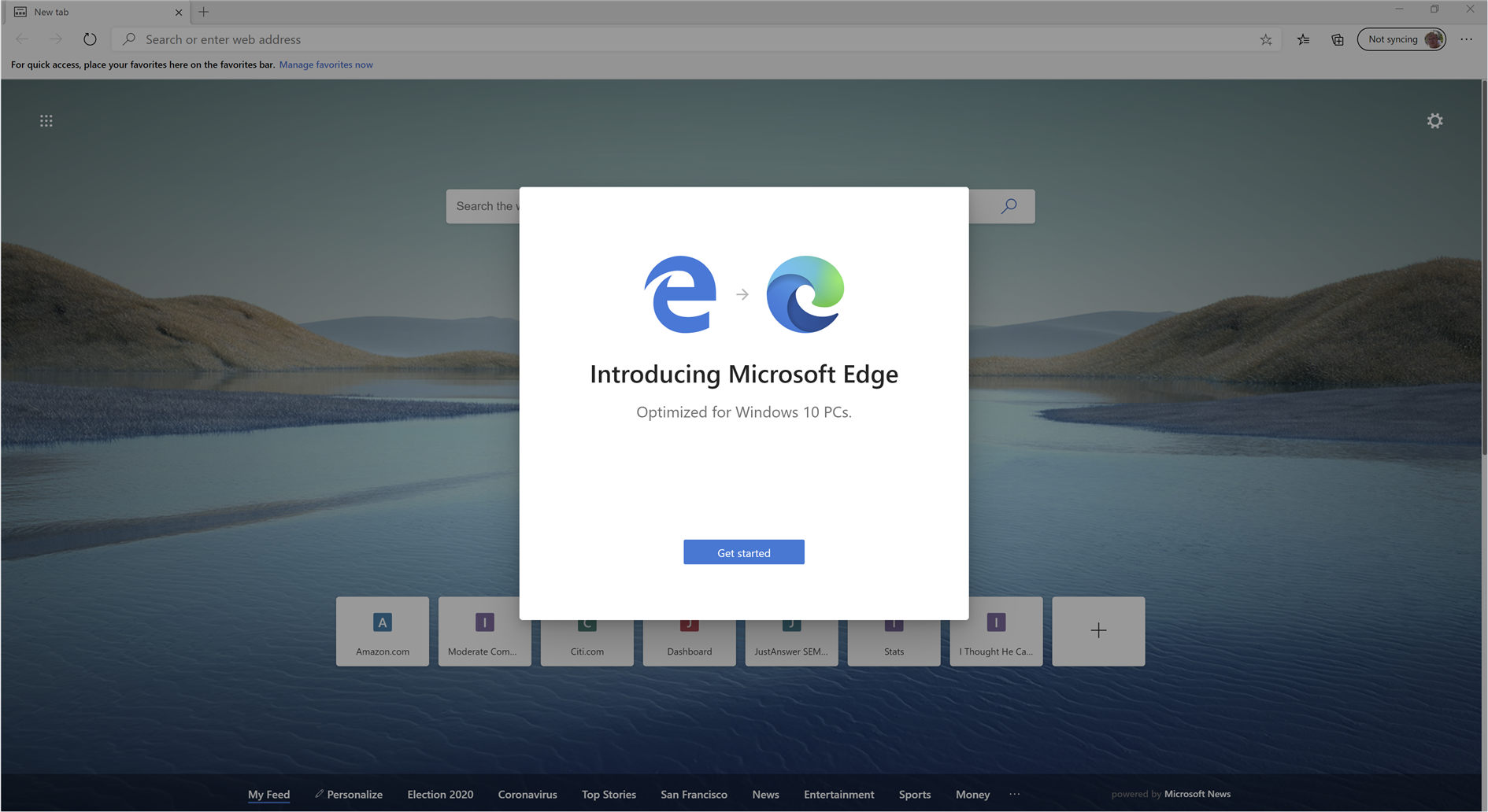
So I'm confused, Microsoft. Do you want me to use Edge? After installing updates Edge wants to 'Get started', on a nice modal with no cancel button or even any little x to close it. Must be some mistake right, not quite ready for prime time if they forgot the 'Don't get started' button. Maybe I'll try it when the kinks are worked out.

Ah, right clicking the icon and choosing close would work, right? Nope. Feels more and more like malware.

You can kill it from task manager so at least someone was paying some attention to usability.

Don't I remember some settlement with the DOJ after an antitrust judgement for forcing browsers on someone? That was a while back, must be remembering a different company.

Using the Azure Monitor REST API from Google Apps Script

By . Updated on

Average Server Response Time in Azure Metrics

This post describes how to get metrics (in this case average response time) from an Azure App Service into a Google Sheet. I’m doing this so I can go from the sheet to a Data Studio dashboard. I already have a report in Data Studio that pulls from Ads, Analytics and other sources. I’d rather spend hours adding Azure there than be forced to have one more tab open. You might have different reasons. Read on. 

  1. Create a Google Sheet and give it a memorable name. Rename the first sheet to AvgResponseTime and put ‘Date’ in A1 and ‘Average Response Time’ in B1.
  2. Create a script (Script editor from the Tools menu) and give that a good name as well.
  3. In the script editor pick Libraries from the Resources menu. Enter 1B7FSrk5Zi6L1rSxxTDgDEUsPzlukDsi4KGuTMorsTQHhGBzBkMun4iDF which is the Google OAuth library, pick the latest version and click Save.
  4. Select Project properties from the File menu and make a note of the Script ID.
  5. Log into your Azure Console and then go to https://resources.azure.com/. You are looking for a metricdefinitions node for the resource that you want to monitor. In my case it’s subscriptions / MyName Subscription / resourceGroups / providers / Microsoft.Web / sites / MySite / metricdefintions. Browse through this list to find the id of the metric you’re interested in. For me it’s AverageResponseTime. Finding this was the hardest part. Microsoft’s documentation for resourceUri is literally ‘The identifier of the resource.’ Why even bother Microsoft? Make a note of the id and remove the ‘metricDefinitions/AverageResponseTime’ from the end, because of course the ID isn’t quite right for some reason. Mine looks something like this: /subscriptions/mylongid/resourceGroups/mysomethingResourceGroup/providers/Microsoft.Web/sites/mysiteid
  6. Go back to the Azure Console and open Azure Active Directory. Select App registrations under Manage and create a New registration. Time to come up with another name. You probably want ‘Accounts in this organizational directory only’. The redirect URL is https://script.google.com/macros/d/SCRIPTID/usercallback - replace SCRIPTID with the Script ID you made a note of in step 4.
  7. Click the View API permissions button, then Add a permission and then pick Azure Service Management. I’m using Delegated permissions and the user_impersonation permission. Then click Grant admin consent for Default Directory.
  8. Go to Certificates & secrets (under manage) and create a new client secret. Make a careful note of it.
  9. Go to Authentication (under Manage), check Access tokens under Implicit grant and then click Save at the top of the page.
  10. Go to Overview and make a note of your Application (client) ID and Directory (tennant) ID.
  11. You are getting close! Go to the script editor (from step 2) and paste in the code at the bottom of this post. There are four variables to enter at the top of the script. ClientID and TennantID are from step 10. ClientSecret is from step 8. ResourceID is from step 5. Save the script.
  12. Reload the spreadsheet (back from step 1). You should get an Azure Monitor menu item. Choose Authorize from this menu. Google will ask you to authorize the script, do this for the Google account you’re using. Choose Authorize again, this time a sidebar will appear with a link. Follow the link and authorize against Azure (if you’re logged in this might just go directly to success). If you get authorization errors in the future run this step again. If that does help use Reset Settings and then try again.
  13. You should be ready to get data. Choose Fetch Data from the Azure Monitor menu. If this doesn’t work check through steps 1-12 carefully again!
  14. Last step - automate. Go back to the script editor. Choose Current project’s triggers from the Edit menu. Add a trigger (the small blue button hidden at the bottom right of the screen - not everything needs a floating action button Google!) to run fetchData daily at some reasonable time.
You should now have a daily record of average response time flowing to a Google sheet. This can easily be extended to support other metrics, and other time periods (you could get data by minute and run the script hourly for instance. See the metrics documentation for more ideas. I got this working for an App Service but it should be roughly the same flow for anything that supports metrics, you’ll just need to work on finding the right resourceUri / ID.

BadImageFormatException for a 64-bit ASP MVC web application

By . Updated on

System.BadImageFormatException for a 64-bit web application in IIS Express

I converted an ASP.NET MVC web application to 64-bit in order to use dlib and it immediately died with a System.BadImageFormatException (Could not load file or assembly 'xxx' or one of its dependencies. An attempt was made to load a program with an incorrect format.)

Assuming I must have a stray wrong-bittedness something lying around I spent way to long with the assembly binding log viewer (Fuslogvw.exe) trying to figure out what I had messed up. But eventually I realized that Visual Studio was launching a 32-bit version of IIS Express to debug a 64-bit web application.

To fix this select Options from the Tools menu, expand Projects and Solutions, choose Web Projects and then check Use the 64-bit version of IIS Express for  web sites and projects. Problem solved.

(Probably shouldn't have this component in the web application - the plan longer term is to move it to an asynchronous process somewhere instead.)