Google Photos killed my Aura Frame

By . Updated on

A sad looking empty photo frame

I want to do two things with my digital photos. First, keep them safe, especially all those precious memories of random parking meters and unfathomable HVAC mechanisms. Second, enjoy looking at the small subset that are precious family moments. I'm not a special snowflake, these basic requirements should represent a large and competitive market. Unfortunately I'm not holding my breath for much in the way of consumer friendly regulation for the next four years in the US.

Google is making some changes to their Photos API next month, which amount to "Get the fuck out of our Photos API". They're a polite organization so they phrase it a little differently: "We're excited to see the creative solutions developers will build using the new Picker API and the updated Library API.". The developer documentation is a little more pointed: "If your app relies on accessing the user's entire library, you may need to re-evaluate your app or consider alternative approaches."

I have an Aura Carver Mat, a nice digital photo frame that I synced to a shared Google Photos album. Easy for me to add photos, way too easy for the kids to add photos - a fantastic device. As of next month it's ewaste though. I'm not going to upload photos slowly through some picker API like an animal. I'm going to end up building something complicated out of a Raspberry Pi (adds to actuarially unrealistic to do list).

This change doesn't impact backup, because that was already broken. For a while Google Photos nicely integrated with Google Drive and I ended up with a local copy of everything that I could then backup through other means. I'm never going to trust any one company to look after important files and so my philosophy is to backup twice online and once to an external hard drive that lives in a fire safe. (At one point I even built a backup company based on this model).

Google killed the Drive integration and so I MacGyvered together an apps script based solution that used the Google Photos API. This revealed to me that the Photos API would not return location information. Even worse it was impossible to get the full resolution version of a video to download. So it's not like I was in love with the API before this most recent change.

My current approach is a mix of sad and awesome. The sad part is that I use Google Takeout once a month to get an archive of all my online photos. Thankfully this still works. The awesome - I wrote this photo sorter tool that takes the messy download and organizes it by year and month. And I also wrote a volume shadow copy tool that lets you backup a drive without getting hung up on locked files. Those pieces get my photos safely to an external drive, and I upload to Amazon Photos too (the third leg of my backup stool).

Update - fixed with a Raspberry Pi!

Folder Insights

Folder Insights

A while back 2TB of storage seemed like plenty. Ooops.

It doesn't help that I'm a digital hoarder. I have everything from email mailboxes from the early 90s to obsolete Android virtual machines that will never run again. I've been forced to do something about it by filling up my backup drive.

My current backup strategy is to send everything to Google Drive. And then send all my pictures to Amazon Photos (free with Prime!). And then backup everything to an external drive (using my VSS tool) every month and stick it in a fire safe because Google and Amazon do not care about my files like I do.

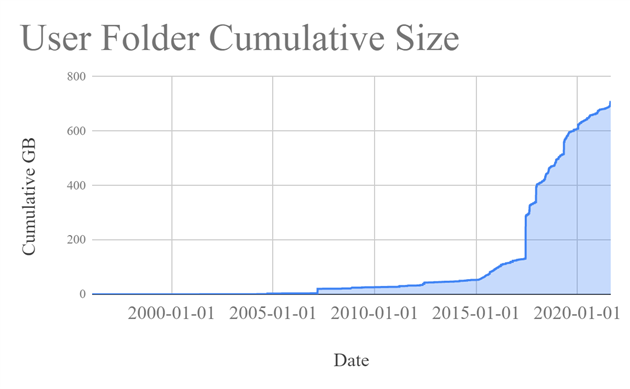
I wrote a little utility to dump some stats to help me accept the problem and then do some tidying. Here's storage over time (imperfect, based on earliest of creation and last write time):

Folder Insights

Some of that is driven by ever better cameras and increased willingness to shoot 4K video. Some of it is crazy projects that I forgot to tidy up after, like making a daily timelapse movie from a nest cam.

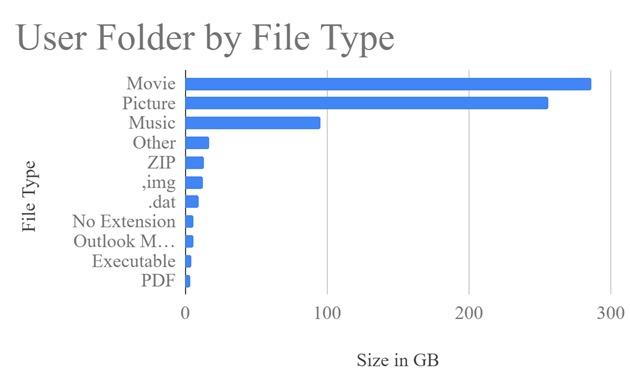
Here's a breakdown by file type:

Folder Insights

Mostly media. New resolution, when I take 500 photos of my thumb I should delete all but the very best right after uploading instead of saving them in case I want to make some kind of thumb-animation later.

The most useful thing the utility does is dump out each folder with more than 1GB of files. That found a lot of cruft hiding in unexpected places (bye bye every frame of the 2017 eclipse that I accidentally left in Google Drive instead of my dedicated time lapse disk). I might improve this over time, but all of the above is available now as folder-insights on GitHub.

Backup locked files on Windows 10: Volume Shadow Copy Update

By . Updated on

Demo of ShadowTask

The Volume Shadow Copy Service (VSS) can be used to mount a copy of a drive in a crash consistent state (like you just unplugged your computer) as a different drive letter. My shadow task command line tool makes it easy to do this. Here's an example:

ShadowTask64 C V test.bat

This creates a shadow copy of the C: drive, mounts it as V: and then runs test.bat. When test.bat completes the shadow V: drive is removed.

What can you do with this?

The simple case is grabbing a copy of a locked file. In this case test.bat could just run pause and then grab the file you need from V:.

It's also a great way to run a backup. In this case the batch file can run XCOPY (to a network share or portable drive) and you'll get all your files including anything locked like running executables or Outlook PST files.

Grab the latest from GitHub: abfo/shadow/releases. You'll find a ZIP file and source code if you want to use/extend this. There are 32 and 64-bit binaries - you need to use the right one for your computer and you also need to run the tool with administrative privileges. This only works with NTFS drives.

(Previously)