I built my ideal flight tracker from bitter experience. Planes, of course, leave late or arrive early. They often drop off tracking for an hour or more, especially on polar routes. You might also forget to download a track while exhausted after a long trip and then it's unavailable by the time you remember to go back and look at it.
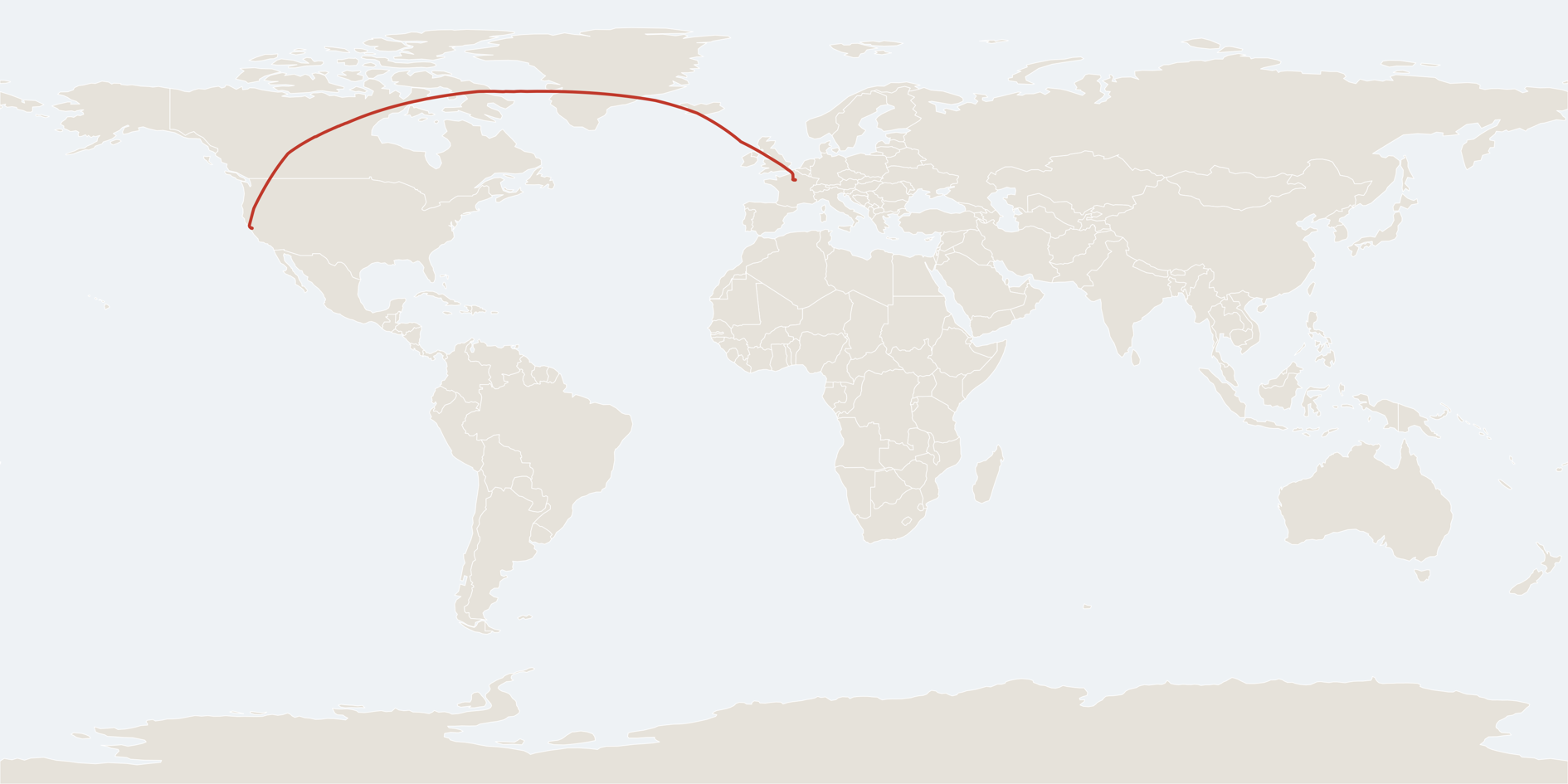
This Google Apps Script project uses the FlightAware API to make this a hands off process. You just put your flights in a spreadsheet in advance and come home to a folder of tracking data. If a flight stops tracking, the script projects its path on a great circle route to the destination airport. When tracking comes back online the script recomputes the projected data to the new good location, leaving you with the best possible version of the data.
(I'm about to leave on a trip that will take me all around the planet - the third time I will have done this, and hopefully the first with an excessively accurate GPS track as a souvenir).
In Google Drive create a new spreadsheet with a Flights tab, and a folder to store the flight tracks. Sign up for the FlightAware AeroAPI and grab an API key. Check that you're comfortable with the pricing - I find it's pretty reasonable for personal use. Once that's ready, create a Google Apps Script project and paste the following script into Code.gs:
/**
 * Flight Logger
 * =============
 *
 * Runs every 10 minutes, works out whether one of your flights is in the air right now, and
 * appends its track to a Google Sheet dedicated to that flight.
 *
 * Each poll fetches the flight's WHOLE track so far, not just the latest fix, and writes whatever
 * is new. So the log ends up at FlightAware's own resolution (roughly a position a minute) rather
 * than one row per ten-minute tick, and a missed or failed tick costs you nothing - the next one
 * backfills it. Adding a flight halfway through backfills the part you missed too.
 *
 * Setup
 * -----
 *   1. Paste this whole file into a new Apps Script project (script.google.com).
 *   2. Fill in the blanks in the Configuration block below.
 *   3. Run setUp() once. Accept the OAuth prompts. It creates the config tab (with headers and a
 *      sample row) and installs the 10-minute trigger.
 *   4. Add your flights to the config tab. Delete the sample row.
 *
 * Configuration spreadsheet schema
 * --------------------------------
 * One tab (CONFIG_SHEET_NAME, default "Flights") with a header row. Columns are matched by header
 * NAME, so the order is up to you and any extra columns of your own are left alone.
 *
 * You fill in:
 *
 *   Flight     (required) Flight ident, e.g. BAW285, BA285, UAL1. ICAO ("BAW285") resolves most
 *                         reliably, but IATA works too.
 *   Departure  (required) Scheduled departure, ISO 8601 TEXT with a UTC offset:
 *                         2026-08-10T20:00:00-07:00
 *                         Monitoring starts at this time. Format the column as plain text
 *                         (Format > Number > Plain text) so Sheets does not turn it into a date -
 *                         setUp() does this for you.
 *   Arrival    (required) Scheduled arrival, same format, in the ARRIVAL city's offset:
 *                         2026-08-12T02:00:00+05:30
 *   Label      (optional) Friendly name used for the output spreadsheet, e.g. SFO-BLR.
 *   Origin     (optional) Departure airport, IATA or ICAO: SFO or KSFO.
 *   Destination(optional) Arrival airport, same. Fill these in when one flight number flies more
 *                         than one leg that day - UA1561 might operate an inbound into SFO and then
 *                         SFO-SAN a few hours later. Without them the right leg is picked by
 *                         whichever scheduled departure is closest to yours, which is correct as
 *                         long as your time is roughly right; with them it is exact. Worth filling
 *                         in on any tight rotation.
 *
 * The script fills in (leave blank):
 *
 *   Complete    1 once the flight is finished. That row is then never looked at again.
 *   FlightId    Cached FlightAware fa_flight_id, so the ident is only resolved once.
 *   MaxAltFt    Highest altitude seen so far. Informational - the landing test recomputes it from
 *               the track every time rather than trusting this cell.
 *   Lat         Where the aircraft was as of the last poll: latitude, longitude, and altitude in
 *   Lon         feet. Refreshed every tick while the flight is being tracked, so the config sheet
 *   AltFt       shows the current position without opening the log. All three are set to 0 when
 *               the flight is marked Complete.
 *   SheetUrl    Link to this flight's output spreadsheet.
 *   Rows        Number of positions logged so far.
 *   LastChecked ISO timestamp of the most recent poll.
 *   Status      What happened last time: waiting for position / en route ... / landed / cancelled /
 *               timed out / an error message.
 *
 * How a flight starts and stops
 * -----------------------------
 * A row is monitored from its scheduled Departure onwards, so a late pushback is fine.
 *
 * Deciding it has LANDED is the part that has to be careful, because a single bad altitude reading
 * must never truncate the log. Two things have to be true before any altitude-based test is even
 * considered:
 *
 *   - the aircraft has genuinely flown - the track has to contain a fix above AIRBORNE_ALTITUDE_FT
 *     (2,500 ft by default), which is well clear of the 100 ft ground threshold. A fix at 80 ft on
 *     the takeoff roll, or a spurious low reading during the climb, cannot make the flight look
 *     like it is over, because at that point nothing has been above 2,500 ft yet;
 *   - it has stayed down - the track must end in an unbroken run of on-the-ground fixes, at least
 *     GROUND_FIX_COUNT of them (3) and covering at least GROUND_FIX_MINUTES (5). One glitchy 0 ft
 *     fix in the middle of a cruise fails this immediately, because the run breaks at the fix
 *     before it; a brief spell at ground level, like a rejected takeoff, fails the timespan.
 *
 * Given that, the flight is marked Complete when any of:
 *
 *   - FlightAware reports actual_on (runway arrival)         -> landed. Authoritative, and immune
 *                                                                to bad position data entirely.
 *   - it has flown, and has settled on the ground            -> landed (the two tests above)
 *   - FlightAware reports the flight as cancelled            -> cancelled
 *   - 24 hours have passed since scheduled Departure         -> timed out
 *
 * The last one is the hard safety net: nothing logs forever. A confirmed landing ends the log
 * whether it happens early or six hours late. Several flights can be live in the same tick - each
 * row is processed independently, and one failing row never stops the others.
 *
 * Tracking gaps
 * -------------
 * A gap in the feed is never treated as evidence of anything. Polar routes routinely go quiet for
 * an hour or more, and an oceanic crossing can too, so the script assumes positions will start
 * arriving again and just keeps waiting. Nothing here times a flight out for going silent; only
 * the 24 hour cap does, and only measured from scheduled departure.
 *
 * The log fills those gaps in rather than leaving a hole. Every row on the Track sheet carries a
 * TrackerStatus saying where it came from:
 *
 *   FLIGHTAWARE   a real fix, exactly as the API reported it. Never edited once written.
 *   PROJECTED     a guess. Once the feed has been quiet for TRACK_GAP_MINUTES, a fix is added
 *                 every SYNTHETIC_FIX_MINUTES, walking the great circle from the last real fix
 *                 toward the destination airport at the last known groundspeed. This is the best
 *                 estimate available while the aircraft is out of contact.
 *   INTERPOLATED  a better guess, made in hindsight. When the feed comes back, every projection
 *                 in the gap is rewritten to sit on the great circle between the real fix that
 *                 opened the gap and the real fix that closed it, spaced evenly by time.
 *
 * So a dropout produces PROJECTED rows while it lasts, and those same rows become INTERPOLATED as
 * soon as there is a fix on the far side to aim at. This happens as many times as the feed drops.
 * Destination coordinates come from airports.js, which must be pasted into the project alongside
 * this file; without it, or without the Destination column filled in, gaps are simply left empty.
 *
 * Synthetic rows never influence anything that matters. The landing tests, the altitude tests and
 * MaxAltFt all run on real fixes only - a projection cannot land an aeroplane, mark a flight
 * complete, or invent a maximum altitude. They exist to make the track drawable.
 *
 * The one consequence worth knowing: if the feed dies during the descent and never posts a single
 * on-the-ground fix, the altitude tests have nothing to work with. Past the scheduled arrival the
 * script starts asking FlightAware directly each tick, so such a flight normally still finishes on
 * actual_on. Failing even that, it finishes on the 24 hour cap.
 *
 * If a flight never climbs above AIRBORNE_ALTITUDE_FT (a very short low-level hop), the altitude
 * tests likewise never fire and it finishes on actual_on, or failing that on the cap. That is the
 * safe direction to fail in: a few wasted queries rather than a truncated track.
 *
 * AeroAPI cost
 * ------------
 * AeroAPI bills per query. Normal running is one query per active flight per tick (6/hour), plus
 * one to resolve the ident, one when the output sheet is created, and one or two to confirm the
 * landing. A 12-hour flight is roughly 75 queries. Fetching the whole track rather than the last
 * position is still one query, but it is a much larger response - check the current AeroAPI
 * pricing page if you are close to a tier boundary.
 */

// ---------------------------------------------------------------------------
// Configuration
// ---------------------------------------------------------------------------

// FlightAware AeroAPI v4 key (flightaware.com/aeroapi).
const FLIGHTAWARE_API_KEY = '';

// ID of the spreadsheet holding your flight configuration - the long string in its URL,
// https://docs.google.com/spreadsheets/d/THIS_BIT/edit
const CONFIG_SPREADSHEET_ID = '';

// Tab within that spreadsheet.
const CONFIG_SHEET_NAME = 'Flights';

// ID of the Drive folder that per-flight spreadsheets get created in - the last part of the
// folder URL, https://drive.google.com/drive/folders/THIS_BIT
const OUTPUT_FOLDER_ID = '';

// How often the trigger fires. Apps Script only allows 1, 5, 10, 15 or 30.
const CHECK_INTERVAL_MINUTES = 10;

// Give up on a flight this long after its scheduled departure, whatever else is happening.
const MAX_MONITOR_HOURS = 24;

// At or below this altitude the aircraft counts as being on the ground.
const GROUND_ALTITUDE_FT = 100;

// The aircraft has to get above this before any altitude-based landing test is allowed to fire.
// Keep it well clear of GROUND_ALTITUDE_FT - that gap is what stops a low fix just after takeoff,
// or a bad reading during the climb, from looking like an arrival.
const AIRBORNE_ALTITUDE_FT = 2500;

// How many consecutive on-the-ground fixes, spanning how long, before we call it a landing. This
// is what a single glitchy 0 ft fix has to get past, and cannot.
const GROUND_FIX_COUNT = 3;
const GROUND_FIX_MINUTES = 5;

// Coverage gaps. Once the feed has been silent this long, the log starts carrying synthetic fixes
// so the track stays continuous across a polar or oceanic dropout.
const TRACK_GAP_MINUTES = 5;

// How often a synthetic fix is emitted while filling a gap.
const SYNTHETIC_FIX_MINUTES = 5;

// ---------------------------------------------------------------------------
// Constants
// ---------------------------------------------------------------------------

const AEROAPI_BASE = 'https://aeroapi.flightaware.com/aeroapi/';

const CONFIG_HEADERS = [
  'Flight', 'Departure', 'Arrival', 'Label', 'Origin', 'Destination',
  'Complete', 'FlightId', 'MaxAltFt', 'Lat', 'Lon', 'AltFt',
  'SheetUrl', 'Rows', 'LastChecked', 'Status'
];

const REQUIRED_HEADERS = ['Flight', 'Departure', 'Arrival', 'Complete'];

const TRACK_SHEET_NAME = 'Track';
const INFO_SHEET_NAME = 'Info';

const TRACK_HEADERS = [
  'Timestamp (UTC)', 'Timestamp', 'Latitude', 'Longitude',
  'Altitude (ft)', 'Altitude (FL)', 'Groundspeed (kt)', 'Heading', 'Update type', 'TrackerStatus'
];

// Column indexes within a Track row, zero based.
const TRACK_COL_ISO = 0;
const TRACK_COL_LAT = 2;
const TRACK_COL_LON = 3;
const TRACK_COL_ALT_FT = 4;
const TRACK_COL_SPEED = 6;
const TRACK_COL_HEADING = 7;
const TRACK_COL_UPDATE = 8;
const TRACK_COL_TRACKER = 9;

// TrackerStatus values.
const TRACKER_LIVE = 'FLIGHTAWARE';         // a real fix, as reported by the API
const TRACKER_PROJECTED = 'PROJECTED';      // a guess ahead of the last fix, toward the destination
const TRACKER_INTERPOLATED = 'INTERPOLATED'; // a guess between two real fixes, now that both are known

const EARTH_RADIUS_NM = 3440.065;

// ISO 8601 with a mandatory UTC offset (Z, +05:30 or +0530).
const ISO_WITH_OFFSET = /^\d{4}-\d{2}-\d{2}[T ]\d{2}:\d{2}(:\d{2})?(\.\d+)?(Z|z|[+-]\d{2}:?\d{2})$/;

const MS_PER_MINUTE = 60 * 1000;
const MS_PER_HOUR = 60 * MS_PER_MINUTE;
const MS_PER_DAY = 24 * MS_PER_HOUR;

// ---------------------------------------------------------------------------
// Entry points
// ---------------------------------------------------------------------------

/**
 * The trigger target. Polls every flight that is due to be monitored.
 */
function logFlights() {
  const lock = LockService.getScriptLock();
  if (!lock.tryLock(30000)) {
    console.log('Another run is still going; skipping this tick.');
    return;
  }

  try {
    const sheet = getConfigSheet();
    const rows = readConfigRows(sheet);
    const now = new Date();
    let checked = 0;

    rows.forEach(function (row) {
      try {
        if (processFlight(row, now)) checked++;
      } catch (err) {
        const message = (err && err.message) ? err.message : String(err);
        row.set('Status', 'ERROR: ' + message);
        row.set('LastChecked', toIsoUtc(now));
        console.error('Row %s (%s): %s', row.rowNumber, row.get('Flight'), message);
      } finally {
        row.flush();
      }
    });

    console.log('Checked %s active flight(s) of %s configured.', checked, rows.length);
  } finally {
    lock.releaseLock();
  }
}

/**
 * Run once by hand. Creates the config tab if it is missing and installs the trigger.
 */
function setUp() {
  if (!CONFIG_SPREADSHEET_ID) {
    throw new Error('Set CONFIG_SPREADSHEET_ID at the top of this script first.');
  }

  const spreadsheet = SpreadsheetApp.openById(CONFIG_SPREADSHEET_ID);
  let sheet = spreadsheet.getSheetByName(CONFIG_SHEET_NAME);

  if (!sheet) {
    sheet = spreadsheet.insertSheet(CONFIG_SHEET_NAME);
  }

  if (sheet.getLastRow() === 0) {
    sheet.getRange(1, 1, 1, CONFIG_HEADERS.length)
      .setValues([CONFIG_HEADERS])
      .setFontWeight('bold');
    sheet.setFrozenRows(1);

    // Departure and Arrival must stay text, or Sheets eats the UTC offset.
    const departureColumn = CONFIG_HEADERS.indexOf('Departure') + 1;
    const arrivalColumn = CONFIG_HEADERS.indexOf('Arrival') + 1;
    sheet.getRange(2, departureColumn, sheet.getMaxRows() - 1, 1).setNumberFormat('@');
    sheet.getRange(2, arrivalColumn, sheet.getMaxRows() - 1, 1).setNumberFormat('@');

    sheet.appendRow([
      'BAW285',
      '2026-08-10T20:00:00-07:00',
      '2026-08-12T02:00:00+05:30',
      'SFO-BLR (sample - delete me)',
      'SFO',
      'BLR'
    ]);
    sheet.autoResizeColumns(1, CONFIG_HEADERS.length);
    console.log('Created the "%s" tab with a sample row.', CONFIG_SHEET_NAME);
  } else {
    console.log('The "%s" tab already exists; leaving it alone.', CONFIG_SHEET_NAME);
  }

  installTrigger();
}

/**
 * Installs the recurring trigger, replacing any existing one.
 */
function installTrigger() {
  removeTriggers();
  ScriptApp.newTrigger('logFlights')
    .timeBased()
    .everyMinutes(CHECK_INTERVAL_MINUTES)
    .create();
  console.log('Trigger installed: logFlights every %s minutes.', CHECK_INTERVAL_MINUTES);
}

/**
 * Removes every trigger pointing at logFlights.
 */
function removeTriggers() {
  ScriptApp.getProjectTriggers().forEach(function (trigger) {
    if (trigger.getHandlerFunction() === 'logFlights') {
      ScriptApp.deleteTrigger(trigger);
    }
  });
}

// ---------------------------------------------------------------------------
// Per-flight processing
// ---------------------------------------------------------------------------

/**
 * Polls one configured flight. Returns true if it was due for a check this tick.
 */
function processFlight(row, now) {
  if (isComplete(row)) return false;

  const ident = trimmed(row.get('Flight'));
  if (!ident) return false; // blank row

  const departure = parseIsoDate(row.get('Departure'), 'Departure', ident);
  const arrival = parseIsoDate(row.get('Arrival'), 'Arrival', ident);

  if (now < departure) return false; // not time yet

  row.set('LastChecked', toIsoUtc(now));

  const deadline = new Date(departure.getTime() + MAX_MONITOR_HOURS * MS_PER_HOUR);

  // Resolve the ident to a FlightAware flight id, once, and cache it.
  let faFlightId = trimmed(row.get('FlightId'));
  let resolved = null;

  if (!faFlightId) {
    const origin = trimmed(row.get('Origin'));
    const destination = trimmed(row.get('Destination'));
    const route = describeRoute(origin, destination);

    resolved = resolveFlight(ident, departure, origin, destination);
    if (!resolved) {
      if (now > deadline) {
        return finish(row, 'timed out', 'FlightAware never listed ' + ident + route);
      }
      row.set('Status', 'waiting for FlightAware to list ' + ident + route);
      return true;
    }
    faFlightId = resolved.fa_flight_id;
    row.set('FlightId', faFlightId);
  }

  // The whole track every time - so the log fills in at FlightAware's resolution rather than ours,
  // and a tick we miss is picked up by the next one.
  const positions = fetchTrack(faFlightId);

  let newestTracker = TRACKER_LIVE;

  if (positions && positions.length) {
    const track = getOrCreateTrackSheet(row, ident, faFlightId, departure, arrival, resolved);
    const series = syncTrackSheet(track, positions, destinationCoords(row), now);

    if (series.length) {
      row.set('Rows', series.length);
      // The row shows the best current estimate, synthetic or not, so it always agrees with the
      // bottom of the log.
      recordLastPosition(row, series);
      newestTracker = series[series.length - 1].tracker;
    }
    row.set('MaxAltFt', maxAltitudeFt(positions));
  }

  // Only ever real fixes decide whether the flight is over. A projection must never be able to
  // land an aeroplane.
  const stillActive = evaluateFlight(row, faFlightId, positions, now, arrival, deadline);

  // Say so when the position on the row is a guess rather than a report.
  if (stillActive && !isComplete(row) && newestTracker !== TRACKER_LIVE) {
    row.set('Status', row.get('Status') + ' [' + newestTracker + ']');
  }

  return stillActive;
}

/**
 * Decides whether the flight is over, and records what we think is going on.
 *
 * Everything here is recomputed from the track on every tick, so no stored flag can get stuck in a
 * state that ends the log early.
 */
function evaluateFlight(row, faFlightId, positions, now, arrival, deadline) {
  const pastArrival = now > arrival;
  const latest = (positions && positions.length) ? positions[positions.length - 1] : null;

  // Has it actually flown? Not "has it left the ground" - has it climbed well clear of it.
  const hasFlown = !!positions && maxAltitudeFt(positions) >= AIRBORNE_ALTITUDE_FT;

  const onGround = !!latest && latest.altitudeFt !== null && latest.altitudeFt <= GROUND_ALTITUDE_FT;
  const settled = hasFlown && isSettledOnGround(positions);

  // Ask FlightAware for the flight's own view of things only when the flight could plausibly be
  // over: it has flown and is down, or the schedule says it should have arrived by now. A gap in
  // the feed is never a reason on its own - see the note on tracking gaps below. That keeps the
  // steady-state cost at one billed query per tick.
  const needStatus = (hasFlown && (settled || onGround)) || pastArrival;

  if (needStatus) {
    const status = fetchFlightStatus(faFlightId);
    if (status) {
      if (status.cancelled) {
        return finish(row, 'cancelled', 'FlightAware reports this flight as cancelled');
      }
      // A runway arrival time is authoritative and needs no help from the altitude readings.
      if (status.actual_on) {
        return finish(row, 'landed', 'touchdown ' + status.actual_on);
      }
    }
  }

  // It flew, and it has now been on the ground for several consecutive fixes. One bad reading
  // cannot get here, because the fixes either side of it would still be at altitude.
  if (settled) {
    return finish(row, 'landed', 'on the ground for more than ' + GROUND_FIX_MINUTES + ' minutes');
  }

  if (now > deadline) {
    return finish(row, 'timed out', 'more than ' + MAX_MONITOR_HOURS + ' hours since scheduled departure');
  }

  row.set('Status', describeStatus(latest, hasFlown, onGround, pastArrival));
  return true;
}

/**
 * True when the track ends in an unbroken run of on-the-ground fixes that is both long enough to
 * count (GROUND_FIX_COUNT) and covers enough time (GROUND_FIX_MINUTES).
 *
 * Note it walks back over however many consecutive ground fixes there are, rather than looking at a
 * fixed number of them. That matters: FlightAware posts roughly a fix a minute, so any fixed window
 * of three fixes could only ever span two minutes and the time test could never pass. Walking the
 * run also copes with a sparse feed, where three fixes might cover fifteen minutes.
 *
 * Both halves earn their place. The count stops a lone bad reading - the run breaks at the fix
 * before it. The timespan stops a brief spell at ground level, like a rejected takeoff.
 */
function isSettledOnGround(positions) {
  if (!positions || !positions.length) return false;

  const newest = positions[positions.length - 1];
  let count = 0;
  let oldestInRun = null;

  for (let i = positions.length - 1; i >= 0; i--) {
    const p = positions[i];
    if (p.altitudeFt === null || p.altitudeFt > GROUND_ALTITUDE_FT) break;
    count++;
    oldestInRun = p;
  }

  if (count < GROUND_FIX_COUNT) return false;

  const span = newest.timestamp.getTime() - oldestInRun.timestamp.getTime();
  return span >= GROUND_FIX_MINUTES * MS_PER_MINUTE;
}

/**
 * Copies the aircraft's latest position onto the config row.
 *
 * Latitude and longitude come from the newest fix. Altitude comes from the newest fix that
 * actually reported one, which is not always the same fix - a position can arrive with no
 * altitude, and blanking the column because of one gappy report would be worse than useless.
 * "Last known", in other words, rather than "last".
 */
function recordLastPosition(row, positions) {
  const latest = positions[positions.length - 1];
  row.set('Lat', roundTo5(latest.latitude));
  row.set('Lon', roundTo5(latest.longitude));

  for (let i = positions.length - 1; i >= 0; i--) {
    if (positions[i].altitudeFt !== null) {
      row.set('AltFt', Math.round(positions[i].altitudeFt));
      return;
    }
  }
}

/**
 * Five decimal places is about a metre, and keeps floating point noise out of the sheet.
 */
function roundTo5(value) {
  return Math.round(value * 100000) / 100000;
}

function maxAltitudeFt(positions) {
  let max = 0;
  (positions || []).forEach(function (p) {
    if (p.altitudeFt !== null && p.altitudeFt > max) max = p.altitudeFt;
  });
  return max;
}

/**
 * Marks a row complete so it is never looked at again.
 */
function finish(row, status, note) {
  row.set('Complete', 1);
  row.set('Status', note ? status + ' - ' + note : status);

  // The aircraft is no longer anywhere worth reporting. Zeroing these rather than leaving the last
  // fix behind means a glance down the sheet shows only live flights carrying a position. This runs
  // after recordLastPosition, so the zeroes are what actually get written this tick.
  row.set('Lat', 0);
  row.set('Lon', 0);
  row.set('AltFt', 0);

  console.log('%s: %s (%s)', row.get('Flight'), status, note || '');
  return true;
}

/**
 * " from SFO to SAN" / " from SFO" / "" - for status messages, so a row that is waiting says which
 * leg it is waiting for.
 */
function describeRoute(origin, destination) {
  if (origin && destination) return ' from ' + origin + ' to ' + destination;
  if (origin) return ' from ' + origin;
  if (destination) return ' to ' + destination;
  return '';
}

function describeStatus(latest, hasFlown, onGround, pastArrival) {
  const late = pastArrival ? ' (past scheduled arrival)' : '';

  if (!latest) {
    return 'waiting for position' + late;
  }

  const where = latest.latitude.toFixed(2) + ', ' + latest.longitude.toFixed(2);

  if (onGround) {
    return (hasFlown ? 'on the ground at ' : 'on the ground before departure at ') + where + late;
  }

  const altitude = latest.altitudeFt === null
    ? 'altitude unknown'
    : Math.round(latest.altitudeFt) + ' ft';
  return (hasFlown ? 'en route ' : 'climbing out ') + where + ' at ' + altitude + late;
}

// ---------------------------------------------------------------------------
// FlightAware AeroAPI v4
// ---------------------------------------------------------------------------

/**
 * Finds the flight whose scheduled departure is closest to the one configured, and returns the
 * whole flight object (or null if FlightAware does not know about it yet).
 */
function resolveFlight(ident, departure, origin, destination) {
  // The ident search window is capped at 10 days in the past and 2 days into the future.
  const now = Date.now();
  let start = new Date(departure.getTime() - MS_PER_DAY);
  let end = new Date(departure.getTime() + MS_PER_DAY);

  const earliest = new Date(now - 9.5 * MS_PER_DAY);
  const latest = new Date(now + 1.5 * MS_PER_DAY);
  if (start < earliest) start = earliest;
  if (end > latest) end = latest;
  if (start >= end) return null;

  const path = 'flights/' + encodeURIComponent(ident) +
    '?start=' + encodeURIComponent(toIsoUtc(start)) +
    '&end=' + encodeURIComponent(toIsoUtc(end));

  const json = aeroApiGet(path);
  const flights = json && json.flights;
  if (!flights || !flights.length) return null;

  // One flight number often flies several legs in a day - UA1561 might operate an inbound into SFO
  // and then SFO-SAN a few hours later. Picking by departure time alone gets that right as long as
  // the configured time is roughly correct, but on a tight rotation an hour's error (say the wrong
  // UTC offset) would silently pick the previous leg and log the wrong aeroplane. If Origin and/or
  // Destination are filled in, use them to narrow the field first - that is exact, not a guess.
  let candidates = flights;

  if (origin || destination) {
    candidates = flights.filter(function (flight) {
      return airportMatches(flight.origin, origin) && airportMatches(flight.destination, destination);
    });
    // Nothing on that route: better to wait and retry than to log a different leg. The row keeps
    // trying each tick and the 24 hour cap ends it if the codes were simply wrong.
    if (!candidates.length) return null;
  }

  let best = null;
  let bestDelta = Infinity;

  candidates.forEach(function (flight) {
    const scheduled = flight.scheduled_out || flight.scheduled_off || flight.actual_out;
    const delta = scheduled
      ? Math.abs(new Date(scheduled).getTime() - departure.getTime())
      : Infinity;
    if (delta < bestDelta) {
      bestDelta = delta;
      best = flight;
    }
  });

  const chosen = best || candidates[0];
  return chosen.fa_flight_id ? chosen : null;
}

/**
 * Does this AeroAPI airport object answer to the code the user typed? Accepts IATA (SFO), ICAO
 * (KSFO) or the LID, in any case. A blank code matches anything - the column is optional.
 */
function airportMatches(airport, code) {
  const want = trimmed(code).toUpperCase();
  if (!want) return true;
  if (!airport) return false;

  const keys = ['code', 'code_iata', 'code_icao', 'code_lid'];
  const reported = [];

  for (let i = 0; i < keys.length; i++) {
    const value = String(airport[keys[i]] || '').toUpperCase();
    if (!value) continue;
    if (value === want) return true;
    reported.push(value);
  }

  // No literal match. The user may have typed SFO where AeroAPI reported only KSFO, or the other
  // way round, so fall back to asking whether the two codes name the same airport.
  for (let i = 0; i < reported.length; i++) {
    if (sameAirport(reported[i], want)) return true;
  }
  return false;
}

/**
 * Do two airport codes refer to the same place? Compares coordinates via airports.js, which holds
 * both the IATA and the ICAO code for each airport, so SFO and KSFO resolve alike.
 */
function sameAirport(a, b) {
  if (!a || !b) return false;
  if (a.toUpperCase() === b.toUpperCase()) return true;
  if (typeof airportCoords !== 'function') return false;

  const first = airportCoords(a);
  const second = airportCoords(b);
  return !!first && !!second && first[0] === second[0] && first[1] === second[1];
}

/**
 * The flight's track so far, oldest fix first. Null when FlightAware has nothing yet.
 *
 * Note the deliberate absence of include_estimated_positions: we want where the aircraft has been,
 * not where it is predicted to go. Predicted points would otherwise be written into the log as
 * though they had happened.
 *
 * Altitude comes back in hundreds of feet, so 350 means 35,000 ft.
 */
function fetchTrack(faFlightId) {
  const json = aeroApiGet('flights/' + encodeURIComponent(faFlightId) + '/track');
  if (!json || !json.positions || !json.positions.length) return null;

  const positions = [];

  json.positions.forEach(function (p) {
    if (p.latitude == null || p.longitude == null || !p.timestamp) return;

    const altitudeFl = (p.altitude == null || isNaN(Number(p.altitude))) ? null : Number(p.altitude);
    const timestamp = new Date(p.timestamp);
    if (isNaN(timestamp.getTime())) return;

    positions.push({
      timestamp: timestamp,
      timestampRaw: p.timestamp,
      latitude: Number(p.latitude),
      longitude: Number(p.longitude),
      altitudeFl: altitudeFl,
      altitudeFt: altitudeFl === null ? null : altitudeFl * 100,
      groundspeed: p.groundspeed == null ? '' : Number(p.groundspeed),
      heading: p.heading == null ? '' : Number(p.heading),
      updateType: p.update_type || ''
    });
  });

  if (!positions.length) return null;

  positions.sort(function (a, b) { return a.timestamp.getTime() - b.timestamp.getTime(); });
  return positions;
}

/**
 * The flight object itself - actual_off, actual_on, cancelled, status and so on.
 */
function fetchFlightStatus(faFlightId) {
  const json = aeroApiGet('flights/' + encodeURIComponent(faFlightId) + '?ident_type=fa_flight_id');
  if (!json || !json.flights || !json.flights.length) return null;
  return json.flights[0];
}

/**
 * GETs an AeroAPI path. Returns the parsed body, or null for a 404 (nothing to report yet).
 */
function aeroApiGet(path) {
  if (!FLIGHTAWARE_API_KEY) {
    throw new Error('FLIGHTAWARE_API_KEY is not set at the top of this script.');
  }

  const response = UrlFetchApp.fetch(AEROAPI_BASE + path, {
    method: 'get',
    headers: { 'x-apikey': FLIGHTAWARE_API_KEY, 'Accept': 'application/json' },
    muteHttpExceptions: true
  });

  const code = response.getResponseCode();
  const body = response.getContentText();

  if (code === 404) return null;
  if (code === 401 || code === 403) {
    throw new Error('FlightAware rejected the API key (HTTP ' + code + '). Check FLIGHTAWARE_API_KEY.');
  }
  if (code === 429) {
    throw new Error('FlightAware rate limit hit (HTTP 429); will retry next tick.');
  }
  if (code < 200 || code >= 300) {
    throw new Error('AeroAPI ' + path + ' failed: HTTP ' + code + ' ' + body.slice(0, 300));
  }

  return JSON.parse(body);
}

// ---------------------------------------------------------------------------
// Per-flight output spreadsheet
// ---------------------------------------------------------------------------

/**
 * Opens this flight's Track sheet, creating the spreadsheet in OUTPUT_FOLDER_ID the first time.
 */
function getOrCreateTrackSheet(row, ident, faFlightId, departure, arrival, resolved) {
  const existingUrl = trimmed(row.get('SheetUrl'));

  if (existingUrl) {
    const id = spreadsheetIdFromUrl(existingUrl);
    if (id) {
      try {
        const sheet = SpreadsheetApp.openById(id).getSheetByName(TRACK_SHEET_NAME);
        if (sheet) return sheet;
      } catch (err) {
        console.warn('Could not reopen %s (%s); creating a fresh log.', existingUrl, err);
      }
    }
  }

  const label = trimmed(row.get('Label')) || ident;
  const name = 'Flight Log - ' + label + ' - ' + Utilities.formatDate(departure, 'UTC', 'yyyy-MM-dd');
  const spreadsheet = SpreadsheetApp.create(name);

  const track = spreadsheet.getActiveSheet();
  track.setName(TRACK_SHEET_NAME);
  track.getRange(1, 1, 1, TRACK_HEADERS.length)
    .setValues([TRACK_HEADERS])
    .setFontWeight('bold');
  track.setFrozenRows(1);
  track.getRange('A:A').setNumberFormat('@');                    // keep the ISO string a string
  track.getRange('B:B').setNumberFormat('yyyy-mm-dd hh:mm:ss');
  track.getRange('C:D').setNumberFormat('0.00000');

  writeInfoSheet(spreadsheet, ident, faFlightId, departure, arrival,
    resolved || fetchFlightStatus(faFlightId));

  if (OUTPUT_FOLDER_ID) {
    DriveApp.getFileById(spreadsheet.getId()).moveTo(DriveApp.getFolderById(OUTPUT_FOLDER_ID));
  }

  row.set('SheetUrl', spreadsheet.getUrl());
  console.log('Created log for %s: %s', ident, spreadsheet.getUrl());
  return track;
}

function writeInfoSheet(spreadsheet, ident, faFlightId, departure, arrival, flight) {
  const info = spreadsheet.insertSheet(INFO_SHEET_NAME);
  const f = flight || {};
  const origin = f.origin || {};
  const destination = f.destination || {};

  const values = [
    ['Flight', ident],
    ['FlightAware id', faFlightId],
    ['Origin', origin.code || origin.code_iata || ''],
    ['Destination', destination.code || destination.code_iata || ''],
    ['Scheduled departure (configured)', toIsoUtc(departure)],
    ['Scheduled arrival (configured)', toIsoUtc(arrival)],
    ['Scheduled out (FlightAware)', f.scheduled_out || ''],
    ['Scheduled on (FlightAware)', f.scheduled_on || ''],
    ['Aircraft type', f.aircraft_type || ''],
    ['Registration', f.registration || ''],
    ['Log created', toIsoUtc(new Date())]
  ];

  info.getRange(1, 1, values.length, 2).setValues(values);
  info.getRange(1, 1, values.length, 1).setFontWeight('bold');
  info.autoResizeColumns(1, 2);
}

/**
 * Brings the Track sheet up to date and returns the full series that is now on it.
 *
 * The sheet is treated as: every real fix ever seen, plus synthetic fixes filling any gap longer
 * than TRACK_GAP_MINUTES. Both halves are recomputed from scratch each tick, which is what makes
 * the patching work - a projection made while blind simply stops being a projection once the fix
 * that closes the gap arrives.
 *
 * Real fixes are read back off the sheet and merged with what the API returned, so history
 * survives even if AeroAPI ever stops returning the early part of a long track.
 */
function syncTrackSheet(track, apiPositions, destination, now) {
  const lastRow = track.getLastRow();
  const existing = lastRow > 1
    ? track.getRange(2, 1, lastRow - 1, TRACK_HEADERS.length).getValues()
    : [];

  const byTime = {};

  existing.forEach(function (row) {
    if (trimmed(row[TRACK_COL_TRACKER]).toUpperCase() !== TRACKER_LIVE) return;  // synthetic, rebuild it
    const ms = Date.parse(String(row[TRACK_COL_ISO]));
    if (isNaN(ms)) return;
    byTime[ms] = rowToFix(row, ms);
  });

  // Anything the API reports wins over the copy on the sheet.
  (apiPositions || []).forEach(function (position) {
    byTime[position.timestamp.getTime()] = position;
  });

  const real = Object.keys(byTime)
    .map(Number)
    .sort(function (a, b) { return a - b; })
    .map(function (ms) { return byTime[ms]; });

  if (!real.length) return [];

  const series = buildTrackSeries(real, destination, now);

  // Rewrite from the first row that is not settled real data. A real fix never changes once
  // written, so the scan can skip the matching prefix and stop at the first synthetic row.
  let from = 0;
  while (from < existing.length && from < series.length &&
    series[from].tracker === TRACKER_LIVE &&
    trimmed(existing[from][TRACK_COL_TRACKER]).toUpperCase() === TRACKER_LIVE &&
    String(existing[from][TRACK_COL_ISO]) === series[from].timestampRaw) {
    from++;
  }

  if (from < series.length) {
    const values = series.slice(from).map(fixToRow);
    track.getRange(2 + from, 1, values.length, TRACK_HEADERS.length).setValues(values);
  }

  // A closed gap usually needs fewer synthetic rows than the projection that preceded it, so the
  // series can be shorter than what is on the sheet. Clear whatever is left over.
  const leftover = existing.length - series.length;
  if (leftover > 0) {
    track.getRange(2 + series.length, 1, leftover, TRACK_HEADERS.length).clearContent();
  }

  return series;
}

/**
 * Real fixes, plus synthetic fixes wherever the feed went quiet for longer than TRACK_GAP_MINUTES.
 *
 * A gap that is closed at both ends is INTERPOLATED along the great circle between the two real
 * fixes. The open-ended gap at the end of the track - the aircraft is out of contact right now -
 * is PROJECTED along the great circle toward the destination.
 */
function buildTrackSeries(real, destination, now) {
  const series = [];

  for (let i = 0; i < real.length; i++) {
    const fix = real[i];
    fix.tracker = TRACKER_LIVE;
    series.push(fix);

    const next = real[i + 1];
    if (next) {
      interpolateGap(fix, next, real, i).forEach(function (f) { series.push(f); });
    }
  }

  projectFromLastFix(real, destination, now).forEach(function (f) { series.push(f); });
  return series;
}

/**
 * Synthetic fixes between two real ones. Position is the great circle between them, walked at a
 * constant rate, which is the same thing as saying the aircraft flew the direct route at a steady
 * speed - the best guess available once both ends are known.
 */
function interpolateGap(a, b, real, indexOfA) {
  const out = [];
  const spanMs = b.timestamp.getTime() - a.timestamp.getTime();
  if (spanMs <= TRACK_GAP_MINUTES * MS_PER_MINUTE) return out;

  const step = SYNTHETIC_FIX_MINUTES * MS_PER_MINUTE;
  const distanceNm = greatCircleDistanceNm(a.latitude, a.longitude, b.latitude, b.longitude);
  const speed = Math.round(distanceNm / (spanMs / MS_PER_HOUR));

  for (let t = a.timestamp.getTime() + step; t < b.timestamp.getTime(); t += step) {
    const fraction = (t - a.timestamp.getTime()) / spanMs;
    const point = pointAlongGreatCircle(a.latitude, a.longitude, b.latitude, b.longitude, fraction);

    out.push(syntheticFix(new Date(t), point,
      interpolateAltitude(a, b, fraction, real, indexOfA),
      speed,
      initialBearing(point.lat, point.lon, b.latitude, b.longitude),
      TRACKER_INTERPOLATED));
  }

  return out;
}

/**
 * Synthetic fixes from the last real fix up to now, heading for the destination at the last known
 * groundspeed. Stops on arrival - there is nothing useful to say about an aircraft that our own
 * arithmetic has already flown into the airport.
 */
function projectFromLastFix(real, destination, now) {
  const out = [];
  if (!destination) return out;                       // no coordinates, nothing to aim at

  const last = real[real.length - 1];
  const elapsedMs = now.getTime() - last.timestamp.getTime();
  if (elapsedMs <= TRACK_GAP_MINUTES * MS_PER_MINUTE) return out;

  const speed = lastKnown(real, function (f) {
    return (f.groundspeed === '' || f.groundspeed === null || !(f.groundspeed > 0))
      ? null : Number(f.groundspeed);
  });
  if (!speed) return out;                             // never had a speed, so cannot guess a distance

  const altitude = lastKnown(real, function (f) { return f.altitudeFt; });
  const totalNm = greatCircleDistanceNm(last.latitude, last.longitude, destination.lat, destination.lon);
  const step = SYNTHETIC_FIX_MINUTES * MS_PER_MINUTE;

  for (let t = last.timestamp.getTime() + step; t <= now.getTime(); t += step) {
    const flownNm = speed * ((t - last.timestamp.getTime()) / MS_PER_HOUR);
    const arrived = flownNm >= totalNm;
    const fraction = totalNm > 0 ? Math.min(flownNm / totalNm, 1) : 1;

    const point = pointAlongGreatCircle(last.latitude, last.longitude,
      destination.lat, destination.lon, fraction);

    out.push(syntheticFix(new Date(t), point, altitude, speed,
      initialBearing(point.lat, point.lon, destination.lat, destination.lon),
      TRACKER_PROJECTED));

    if (arrived) break;
  }

  return out;
}

/**
 * Altitude across a gap: straight line between the two ends when both are known, otherwise
 * whichever end does know, otherwise blank.
 */
function interpolateAltitude(a, b, fraction, real, indexOfA) {
  const start = a.altitudeFt !== null ? a.altitudeFt : lastKnown(real.slice(0, indexOfA + 1),
    function (f) { return f.altitudeFt; });
  const end = b.altitudeFt !== null ? b.altitudeFt : start;

  if (start === null || start === undefined) return null;
  if (end === null || end === undefined) return Math.round(start);
  return Math.round(start + (end - start) * fraction);
}

/**
 * The newest non-null value of some property, scanning backwards. "Last known", not "last".
 */
function lastKnown(fixes, read) {
  for (let i = fixes.length - 1; i >= 0; i--) {
    const value = read(fixes[i]);
    if (value !== null && value !== undefined) return value;
  }
  return null;
}

function syntheticFix(timestamp, point, altitudeFt, groundspeed, heading, tracker) {
  return {
    timestamp: timestamp,
    timestampRaw: toIsoUtc(timestamp),
    latitude: roundTo5(point.lat),
    longitude: roundTo5(point.lon),
    altitudeFl: altitudeFt === null ? null : altitudeFt / 100,
    altitudeFt: altitudeFt,
    groundspeed: groundspeed,
    heading: Math.round(heading),
    updateType: '',
    tracker: tracker
  };
}

function fixToRow(fix) {
  return [
    fix.timestampRaw,
    fix.timestamp,
    fix.latitude,
    fix.longitude,
    fix.altitudeFt === null ? '' : fix.altitudeFt,
    fix.altitudeFl === null ? '' : fix.altitudeFl,
    fix.groundspeed,
    fix.heading,
    fix.updateType,
    fix.tracker
  ];
}

function rowToFix(row, ms) {
  const raw = row[TRACK_COL_ALT_FT];
  const altitudeFt = (raw === '' || raw === null || raw === undefined) ? null : Number(raw);

  return {
    timestamp: new Date(ms),
    timestampRaw: String(row[TRACK_COL_ISO]),
    latitude: Number(row[TRACK_COL_LAT]),
    longitude: Number(row[TRACK_COL_LON]),
    altitudeFl: altitudeFt === null ? null : altitudeFt / 100,
    altitudeFt: altitudeFt,
    groundspeed: row[TRACK_COL_SPEED] === '' ? '' : Number(row[TRACK_COL_SPEED]),
    heading: row[TRACK_COL_HEADING] === '' ? '' : Number(row[TRACK_COL_HEADING]),
    updateType: String(row[TRACK_COL_UPDATE] || ''),
    tracker: TRACKER_LIVE
  };
}

/**
 * Destination coordinates for the projection, from the Destination column via airports.js.
 * Without both of those there is nothing to aim at, and no projection is made.
 */
function destinationCoords(row) {
  const code = trimmed(row.get('Destination'));
  if (!code || typeof airportCoords !== 'function') return null;

  const found = airportCoords(code);
  return found ? { lat: found[0], lon: found[1] } : null;
}

// ---------------------------------------------------------------------------
// Great circle maths
// ---------------------------------------------------------------------------

function toRadians(degrees) { return degrees * Math.PI / 180; }
function toDegrees(radians) { return radians * 180 / Math.PI; }

function normaliseLongitude(degrees) {
  return ((degrees + 540) % 360) - 180;
}

/** Distance in nautical miles, to pair with groundspeed in knots. */
function greatCircleDistanceNm(lat1, lon1, lat2, lon2) {
  const phi1 = toRadians(lat1);
  const phi2 = toRadians(lat2);
  const dPhi = toRadians(lat2 - lat1);
  const dLambda = toRadians(lon2 - lon1);

  const a = Math.sin(dPhi / 2) * Math.sin(dPhi / 2) +
    Math.cos(phi1) * Math.cos(phi2) * Math.sin(dLambda / 2) * Math.sin(dLambda / 2);

  return 2 * Math.atan2(Math.sqrt(a), Math.sqrt(1 - a)) * EARTH_RADIUS_NM;
}

/** Compass bearing in degrees at the start of the great circle from one point to another. */
function initialBearing(lat1, lon1, lat2, lon2) {
  const phi1 = toRadians(lat1);
  const phi2 = toRadians(lat2);
  const dLambda = toRadians(lon2 - lon1);

  const y = Math.sin(dLambda) * Math.cos(phi2);
  const x = Math.cos(phi1) * Math.sin(phi2) - Math.sin(phi1) * Math.cos(phi2) * Math.cos(dLambda);

  return (toDegrees(Math.atan2(y, x)) + 360) % 360;
}

/**
 * The point a given fraction of the way along the great circle between two points. Spherical
 * interpolation, so it follows the route an aircraft actually flies rather than a straight line
 * on a Mercator map - which matters enormously near the pole, where these gaps happen.
 */
function pointAlongGreatCircle(lat1, lon1, lat2, lon2, fraction) {
  const phi1 = toRadians(lat1);
  const lambda1 = toRadians(lon1);
  const phi2 = toRadians(lat2);
  const lambda2 = toRadians(lon2);

  const delta = greatCircleDistanceNm(lat1, lon1, lat2, lon2) / EARTH_RADIUS_NM;
  if (delta === 0 || !isFinite(delta)) return { lat: lat1, lon: lon1 };

  const a = Math.sin((1 - fraction) * delta) / Math.sin(delta);
  const b = Math.sin(fraction * delta) / Math.sin(delta);

  const x = a * Math.cos(phi1) * Math.cos(lambda1) + b * Math.cos(phi2) * Math.cos(lambda2);
  const y = a * Math.cos(phi1) * Math.sin(lambda1) + b * Math.cos(phi2) * Math.sin(lambda2);
  const z = a * Math.sin(phi1) + b * Math.sin(phi2);

  return {
    lat: toDegrees(Math.atan2(z, Math.sqrt(x * x + y * y))),
    lon: normaliseLongitude(toDegrees(Math.atan2(y, x)))
  };
}

// ---------------------------------------------------------------------------
// Configuration spreadsheet
// ---------------------------------------------------------------------------

function getConfigSheet() {
  if (!CONFIG_SPREADSHEET_ID) {
    throw new Error('Set CONFIG_SPREADSHEET_ID at the top of this script.');
  }

  const sheet = SpreadsheetApp.openById(CONFIG_SPREADSHEET_ID).getSheetByName(CONFIG_SHEET_NAME);
  if (!sheet) {
    throw new Error('No tab called "' + CONFIG_SHEET_NAME +
      '" in the configuration spreadsheet. Run setUp() to create it.');
  }
  return sheet;
}

/**
 * Reads the config tab into row objects that know how to write themselves back. Columns are found
 * by header name, and only the cells we actually change get written.
 */
function readConfigRows(sheet) {
  const lastRow = sheet.getLastRow();
  const lastColumn = sheet.getLastColumn();
  if (lastRow < 2 || lastColumn < 1) return [];

  const values = sheet.getRange(1, 1, lastRow, lastColumn).getValues();
  const headers = values[0];
  const columns = {};

  headers.forEach(function (header, index) {
    const name = String(header || '').trim().toLowerCase();
    if (name && !(name in columns)) columns[name] = index;
  });

  const missing = REQUIRED_HEADERS.filter(function (header) {
    return !(header.toLowerCase() in columns);
  });
  if (missing.length) {
    throw new Error('The "' + CONFIG_SHEET_NAME + '" tab is missing these columns: ' +
      missing.join(', ') + '. Expected headers: ' + CONFIG_HEADERS.join(', ') + '.');
  }

  const rows = [];
  for (let i = 1; i < values.length; i++) {
    rows.push(makeRow(sheet, i + 1, values[i], columns));
  }
  return rows;
}

function makeRow(sheet, rowNumber, values, columns) {
  const dirty = {};

  return {
    rowNumber: rowNumber,

    get: function (header) {
      const index = columns[header.toLowerCase()];
      return index === undefined ? '' : values[index];
    },

    set: function (header, value) {
      const index = columns[header.toLowerCase()];
      if (index === undefined) return;      // column not present - nothing to write to
      if (values[index] === value) return;
      values[index] = value;
      dirty[index] = true;
    },

    flush: function () {
      Object.keys(dirty).forEach(function (index) {
        sheet.getRange(rowNumber, Number(index) + 1).setValue(values[index]);
      });
    }
  };
}

function isComplete(row) {
  return isTrue(row.get('Complete'));
}

// ---------------------------------------------------------------------------
// Helpers
// ---------------------------------------------------------------------------

/**
 * Parses a configured time. Insists on ISO 8601 with a UTC offset, because a flight that departs
 * in one timezone and lands in another cannot be described unambiguously any other way.
 */
function parseIsoDate(value, columnName, ident) {
  if (Object.prototype.toString.call(value) === '[object Date]') {
    throw new Error(columnName + ' for ' + ident + ' is a date cell, not text. Select the column, ' +
      'choose Format > Number > Plain text, and retype the time as ISO 8601 with a UTC offset, ' +
      'e.g. 2026-08-10T20:00:00-07:00.');
  }

  const text = String(value == null ? '' : value).trim();
  if (!text) {
    throw new Error(columnName + ' is empty for ' + ident +
      '. Expected ISO 8601 with a UTC offset, e.g. 2026-08-10T20:00:00-07:00.');
  }
  if (!ISO_WITH_OFFSET.test(text)) {
    throw new Error(columnName + ' for ' + ident + ' is "' + text +
      '". Expected ISO 8601 with a UTC offset, e.g. 2026-08-10T20:00:00-07:00.');
  }

  // Normalise "+0530" to "+05:30" and a space separator to T, which V8 is fussier about.
  const normalised = text.replace(' ', 'T').replace(/([+-]\d{2})(\d{2})$/, '$1:$2');
  const ms = Date.parse(normalised);
  if (isNaN(ms)) {
    throw new Error(columnName + ' for ' + ident + ' ("' + text +
      '") is not a date this script can read.');
  }
  return new Date(ms);
}

function toIsoUtc(date) {
  return Utilities.formatDate(date, 'UTC', "yyyy-MM-dd'T'HH:mm:ss'Z'");
}

function spreadsheetIdFromUrl(url) {
  const match = /\/spreadsheets\/d\/([a-zA-Z0-9-_]+)/.exec(url);
  return match ? match[1] : null;
}

function isTrue(value) {
  if (value === true || value === 1) return true;
  const text = String(value == null ? '' : value).trim().toLowerCase();
  return text === '1' || text === 'true' || text === 'yes' || text === 'y';
}

function trimmed(value) {
  return String(value == null ? '' : value).trim();
}
Edit Code.gs to add your API key, the configuration spreadsheet, and the folder for flight tracks.
Finally, run the setup function from the Apps Script debugger. You'll be prompted to authorize the script, and a sample row will be added to the configuration spreadsheet in the Flights tab. The script will also be scheduled to run every ten minutes. You can now add upcoming flights to the spreadsheet. Once you've got this far, I recommend adding a test flight to make sure everything is working before tracking something that you care about.
This is the first Apps Script project I've released that is 100% written by Claude Code - I didn't touch a line of it. I'm sharing because of my painful experience with flight tracks that didn't meet my needs, and the extensive product management process of smoking out edge cases and testing until I had a solution that really works. The image above is a test track from Paris to San Francisco (a randomly chosen flight while I was debugging) and it has two sections where data dropped - the end result captures the actual route as far as possible and I'm really happy with the result.
Enjoy, and leave any questions in the comments.


Add Comment
All comments are moderated. Your email address is used to display a Gravatar and optionally for notification of new comments and to sign up for the newsletter.